Tomohon: Sebayak 17 letusan vulkanis dikeluarkan dari kawah Gunung Lokon, Tomohon, Sulawesi Utara, Selasa (2/8) hingga pukul 21.30 WITA. “Material vulkanis yang dikeluarkan berupa abu putih keabuan dengan ketinggian sekitar 400 meter,” kata petugas Pos Gunung Api Lokon dan Mahawu Kakaskasen, Kota Tomohon, Jemmy Runtuwene.
Gempa 6,8 Skala Richter di pantai Papua Nugini
Gempa dengan kekuatan 6,8 pada skala Richter mengguncang pantai Papua Nugini, Senin, kata U.S. Geological Survey, tapi tak ada peringatan tsunami yang dikeluarkan dan belum ada laporan mengenai kerusakan. Seperti dikutip dari Reuters, USGS menyatakan gempa tersebut tercatat pada pukul 23.39 GMT, Ahad (Senin, 06.39 WIB), 130 kilometer di sebelah timur kota kecil Wewak pada kedalaman 10,4 mil.
Lokon Kembali Semburkan Material Setinggi 300 Meter

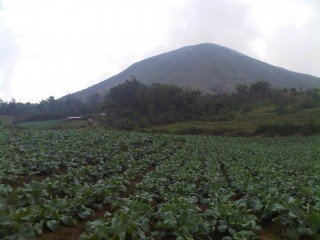 TOMOHON- Muntahan abu vulkanik kembali terlihar dari Kawah Tompaluan Gunung Lokon, Minggu (31/7). Ini setelah terjadi letusan sekitar 07.25 Wita, 09.27 Wita, dan 11.27 Wita. Material yang dikeluarkan lebih banyak dari letusan terakhir Jumat (29/7) lalu sekitar pukul 11.27 Wita, dimana abu vulkanik yang dimuntahkan hanya setinggi 100 meter saja.
“Tak ada lontaran material pijar saat terjadi letusan, hanya abu vulkanik saja,” ujar Farid Bina, Kepala Pos Pemantau Gunung Lokon kepada Tribun Manado, Minggu (31/7).
Sebelum terjadi letusan, terekam gempa Tektonik sebanyak 5 kali dengan amplitudo 32-46, lama gempa 55-200 detik. Terjadi juga 3 kali gempa hembusan dengan amplituda 46 mm dan lama 40-125 detik. “Supply energi terus terjadi ditandai dengan adanya gempa tremor terus menerus dengan amplitudo 0,5-17 mm (dominan 4 mm),” jelasnya.
Menurut Farid, status Gunung Lokon masih tetap siaga dan belum diturunkan karena ancaman letusan magmatig disertai lontaran material pijar, pasir dan hujan abu tebal dengan atau tanpa diikuti aliran awan panas masih memungkinkan terjadi. “Jika ada awan panas, waspadai jalur Sungai Pasahaphen,” katanya.
Lontaran material sendiri diperkirakan sejauh 2,5 Km dari pusat erupsi, sedangkan hujan abu pada radius 3 Km. “Masyarakat dan wisatawan tidak boleh mendekati dan melakukan aktivitas di radius 3 Km, sangat berbahaya,” tukas Farid sembari meminta warga tidak panik dan tidak mudah percaya dengan isu-isu yang menyesatkan seputar aktifitas gunung.
sumber:manado.tribunnews.com
Slideset
The Widgetkit Slideset takes your product showcase to the next level. It provides a sleek way to show multiple sets of items and uses smooth effects while looping through them.
Features
- Clean and very lightweight code
- Eye-catching transition effects
- Fully responsive including all effects
- Support of named custom sets
- Swipe navigation on mobile phones
- Built with HTML5, CSS3, PHP 5.3+ and the latest jQuery version
- Works with Joomla and WordPress
Slide Example
The sets are auto generated (4 items per set), item names are shown and it uses the slide effect and navigation buttons.
[widgetkit id=32]
Zoom Example
The sets are arranged manually, sets names are used as a navigation and it uses the zoom effect.
[widgetkit id=33]
Drops Example
The sets show the item names and it uses the drops effect and navigation buttons.
[widgetkit id=49]
Deck Example
This auto generated sets uses prev/next buttons as a navigation and the deck effect.
[widgetkit id=43]
How To Use
The Widgetkit Slideset takes full advantage of the very user-friendly Widgetkit administration interface. You can create and manage all slidesets and their different items in one place. After you have created a slideset, you can load it anywhere on your website using shortcodes or the universal Widgetkit Joomla module or WordPress widget.
Accordion
The Widgetkit Accordion enables you to display a set of items in a compact space. When clicking on each item’s header, it expands or collapses its content section.
Features
- Clean and very lightweight code
- Responsive design to fit all device resolutions
- Smooth transitions on content section toggle
- Option to automatically match the height of varying content
- Option to auto collapse or allow multiple opened items
- Built with HTML5, CSS3, PHP 5.3+ and the latest jQuery version
- Works with Joomla and WordPress
Example
[widgetkit id=30]
How To Use
The Widgetkit Accordion lets you easily create and manage all the accordion’s contents through the user-friendly Widgetkit administration interface. After you have created an accordion, you can load it anywhere on your website using shortcodes or the universal Widgetkit Joomla module or WordPress widget.
Map
The Widgetkit Map provides a simple solution for adding a map to your website. Various features let you customize the map, like changing colors and adding markers or directions.
Features
- Location selection with auto geocoding
- Supports multiple map markers with text popups
- Option to get the direction to the active marker
- Supports custom map styles and colors
- Uses the latest Google Maps API
- Built with HTML5, CSS3, PHP 5.3+ and the latest jQuery version
- Works with Joomla and WordPress
Direction Example
This map features all map controls, multiple markers and you can get the direction.
[widgetkit id=26]
Color Scheme Example
Set or invert the hue, saturation, lightness and gamma of a map.
[widgetkit id=28]
Minimal Example
This map has a fixed width, no controls and no markers.
[widgetkit id=29]
How To Use
With the Widgetkit Map you can quickly create and manage simple maps with features like multiple markers, text popups and custom color schemes. Once you have created a map, you can load it anywhere on your website using shortcodes or the universal Widgetkit Joomla module or WordPress widget.
Gallery
The Widgetkit Gallery provides a smart and automated way to publish images on your website. You only need to select the image folders and the whole gallery is generated automatically.
Features
- Fully responsive including all effects
- Folder based image selection
- Supports multiple image folders
- Automatic thumbnail creation
- Supports image captions and custom links
- Uses the Widgetkit Spotlight and Lightbox
- Built with HTML5, CSS3, PHP 5.2+ and the latest jQuery version
- Works with Joomla and WordPress
Showcase Box Example
This is an image showcase with eye-catching transition effects and a thumbnail navigation.
[widgetkit id=39]
Image Wall Example
This is an image wall with zoom effect, no margins and squared corners using the lightbox.
[widgetkit id=24]
Polaroid Example
This is an image wall with scattered polaroid pictures using the lightbox.
[widgetkit id=25]
Slider Example 1
This is an image slider where the image centers automatically during the effect. It also features a spotlight caption and the lightbox.
[widgetkit id=27]
Slider Example 2
This is an image slider where the image stays left during the effect.
[widgetkit id=31]
Slideshow Screen Example
This is an image gallery using the nice swipe effect from the slideshow widget.
[widgetkit id=48]
Slideshow Default Example
This is an image gallery using all the features from the slideshow widget.
[widgetkit id=19]
Showcase Example
This is a simple image showcase mashing up all the features from the slideshow and slideset widget.
[widgetkit id=40]
Slideshow Inside Example
This is a very basic slideshow which uses preview thumbnails inside the image as a navigation.
[widgetkit id=54]
Spotlight Example
This is an image wall with some margins and rounded corners using the spotlight and lightbox.
[widgetkit id=23]
Slideset Example
This is an image gallery using all the features from the slideset widget.
[widgetkit id=44]
How To Use
The Widgetkit Gallery comes with a user-friendly administration user interface which let’s you create new galleries with just a few clicks. The integrated directory browser let’s you easily add or remove source directories of your images. All galleries can be loaded anywhere in your theme using shortcodes or the universal Widgetkit Joomla module or WordPress widget.
Media Player
The Widgetkit Media Player is a HTML5 audio and video player completely built with HTML and CSS. You can easily embed video files into your website by using the HTML5 video element. A Flash player fallback is included for all unsupported browsers.
Features
- Native playback for modern HTML5 browsers
- Supports MP4 (h.264), WebM, FLV, WMV and MP3 files
- Completely built with HTML and CSS
- Responsive design to fit all device resolutions
- Same UI in all browsers
- Create your own skins
- Flash player fallback for unsupported browsers
- Works with Joomla and WordPress
Examples
This is a MP3 Audio Sample:
How To Use
Use the HTML5 video element to embed video in your website. For example:
<video src="/video.mp4" width="320" height="240"></video>
You can also provide multiple sources, to add support for the different video formats like h.264, WebM or Ogg:
<video width="320" height="240">
  <source type="video/mp4"  src="/video.mp4" />
  <source type="video/webm" src="/video.webm" />
  <source type="video/ogg"  src="/video.ogv" />
</video>
Use the HTML5 audio element to embed MP3 files in your website. For example:
<audio src="/audio.mp3" type="audio/mp3"></audio>
Gunung Gamalama masih aktif menyemburkan asap hitam
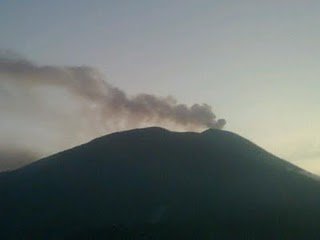 Ternate: Hingga petang kemarin Gunung Api Gamalama, Ternate, Maluku Utara, masih aktif menyemburkan asap hitam tebal ke udara. Asap tebal dilontarkan hingga setinggi 300 meter.Hembusan angin yang cukup kencang sejauh ini masih membawa awan materi vulkanisi ke arah utara. Pos pemantauan Gunung Gamalama menyimpulkan awan hitam berasal dari letusan akumulasi uap air dan abu.
Data seismograf mencatat ada peningkatan gempa tremor di sekitar kawah. Warga dihimbau untuk tidak mendekati kawah dalam radius dua kilometer. Saat ini gunung gamalama berstatus waspada level dua. Sementara di Ternate aktivitas warga tetap berjalan normal meski awan hitam sempat diwaspadai warga.
Sumber:Metrotvnews.com
TOT Makasar Hari Ke-3

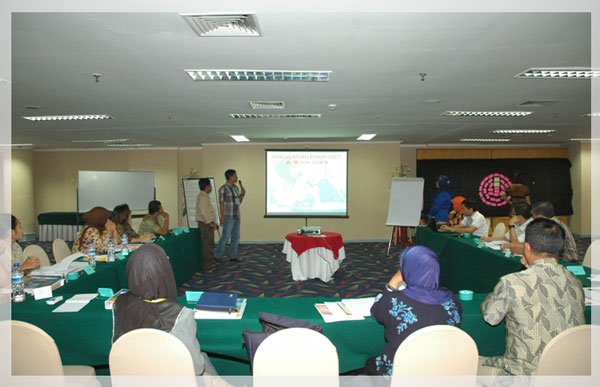
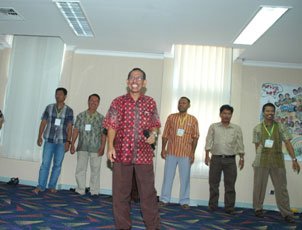
Hari ketiga, Jumat 22 Juli 2011 diawali dengan refleksi kegiatan hari kedua oleh peserta yang terpilih pada hari sebelumnya. Mereka memberikan sedikit kesimpulan tentang materi-materi yang disampaikan pada hari kedua, yaitu tentang Manajemen rumah sakit pada penanggulangan bencana, Dasar-dasar pengorganisasian, Monitoring dan Evaluasi, Analisis risiko rumah sakit dan Dasar-dasar logistic. kemudian diselingi dengan sedikit permainan yang bertujuan untuk membangun kerjasama tim, kebersamaan, strategi, kesabaran, ketepatan dan mentaati peraturan.
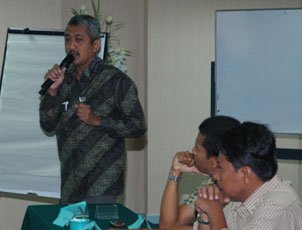 Sesi pertama dimulai dengan Materi yang dibuka oleh seorang Ahli Anestesi, dr. Christijogo, Sp.A. beliau memaparkan tentang Sistem Informasi dan Komunikasi. Tujuan dari materi yang dibawakan adalah untuk membangun suatu budaya agar bisa mengatasi kekurangan maupun ketidak kompakan antar instansi atau subsistem atau badan di lingkungan rumah sakit dalam menghadapi bencana. Selain itu, meningkatkan kecepatan informasi sampai ke tempat tujuan. meningkatkan ketepatan dan keakuratan informasi dan informasi yang ada dapat di pertanggung jawabkan (reliable). Pada sesi pertama ini, peserta diberi penjelasan tentang konsep dasar sistem informasi, siklus pengembangan sistem informasi, sistem informasi kesehatan, serta komunikasi dan koordinasi pada saat terjadi bencana serta pusat komando rumah sakit dalam sistem informasi. Beliau juga memutarkan video emergency cases -triage yang memberikan contoh bahwa pentingnya penyampaian system informasi dan komunikasi dalam rumah sakit dalam penanganan korban.
 Download Materi
 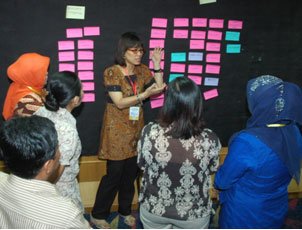 Sesi kedua, penyampaian materi dilanjutkan oleh Seorang Akademisi yang sangat menaruh perhatiannya kepada Manajemen Bencana, sekaligus dari Pusat Manajemen Pelayanan Kesehatan FK UGM, dr. Bella Donna, M.Kes. Materi yang disampaikan adalah tentang fasilitas rumah sakit dalam bencana. Tujuan yang ingin dicapai adalah peserta mampu memahami fasilitas dan sarana prasana rumah sakit yang diperlukan dalam penanganan bencana. Diawal sesi, beliau langsung mengajak peserta kedalam suasana yang lebih santai tapi materi yang ingin disampaikan tercapai dengan diskusi yang dilakukan, media yang digunakan adalah sticky wall dan peserta diminta untuk menempelkan kertas tempel yang sudah dituliskan jawab tentang fasilitas rumah sakit yang diperlukan pada saat terjadi bencana sesuai dengan jenis bencana yang dihadapi, baik bencana internal maupun eksternal. Harapannya adalah , bagaimana peserta mengerti bahwa Rumah Sakit dapat merubah fungsi ruangan yang dipakai sehari-hari menjadi ruangan yang digunakan untuk penanganan bencana.
 Sesi ketiga adalah materi Teknik Melatih, disampaikan oleh Natsir, S.Pd, M.M, Pusdiklat Aparatur Kemenkes RI. Tujuan pembelajaran materi ini secara umum adalah agar peserta mampu mempraktikkan kegiatan menjadi fasilitator dalam proses pembelajaran pelatihan dikelas. Sementara itu, secara khusus adalah mempersiapkan proses pembelajaran, memilih ragam metode pembelajaran yang tepat/efektif untuk kebutuhan dan tujuan pembelajaran, memilih media dan alat bantu sesuai metode dan tujuan pembelajaran, menciptakan iklim pembelajaran yang kondusif, menggunakan teknik presentasi interaktif pada proses pembelajaran materi yang difasilitasi serta melakukan evaluasi hasil pembelajaran. Di akhir sesi, peserta dibagi menjadi 2 kelompok untuk membuat Satuan Acara Pembelajaran dan Powerpoin materi untuk kegiatan Micro Teaching.
Gallery Kegiatan Hari Ke 3
{gallery}tot_m3{/gallery}
{jcomments on}